
Plan in Microsoft Project
Keep MS-Project as your scheduling engine. Steel enriches it with governance metadata, timebox classification and deliverable tracking — all without changing your existing project structure.
Available nowSteel connects Microsoft Project, issue tracking and ITSM tools, and reporting workflows to help project managers govern delivery, track execution and produce structured project control outputs.
Steel Free will be available at no cost. No credit card required.
Steel does not replace Microsoft Project, issue tracking or ITSM tools. It acts as the orchestration layer above them — governing data flow, tracking actuals, and making project performance readable at any level.
Keep MS-Project as your scheduling engine. Steel enriches it with governance metadata, timebox classification and deliverable tracking — all without changing your existing project structure.
Available nowPush tasks from MS-Project to Jira and pull actuals back. Time logs and completion percentages recorded by your team flow directly into MS-Project, enabling EVM calculation without manual entry.
Available nowGenerate SAL progress reports and cost control outputs automatically from customizable Excel templates. No copy-paste, no reformatting — just structured, repeatable project reporting.
Available nowSteel works inside your existing Microsoft Project setup. These are real screenshots from the current version — no mockups, no simulations.
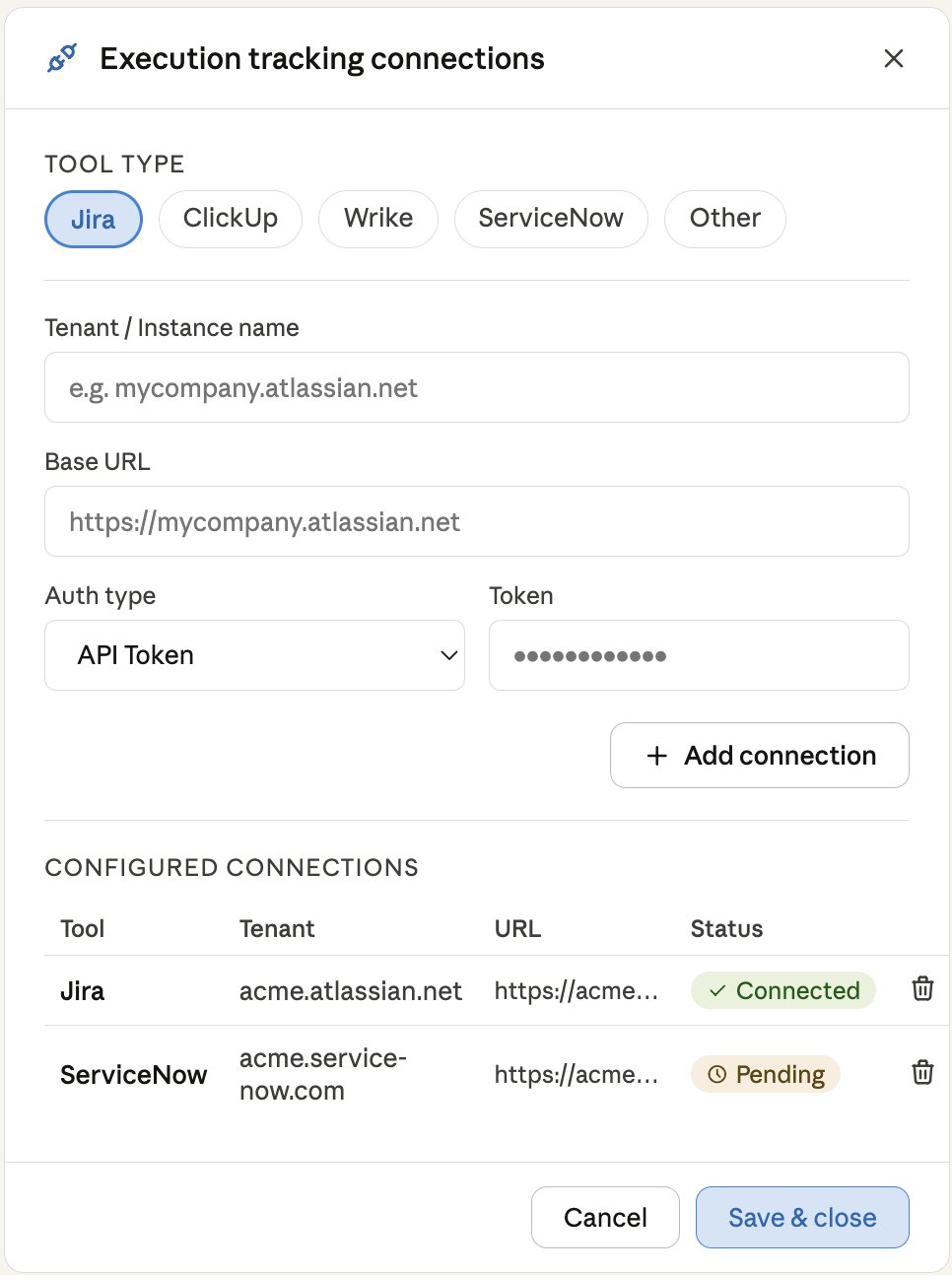
Steel is designed to connect Microsoft Project to different issue tracking and ITSM systems through a single configuration panel, supporting independent connections and multi-instance and multi-tenant scenarios. Steel Free includes integration with Jira Cloud and Jira Data Center.
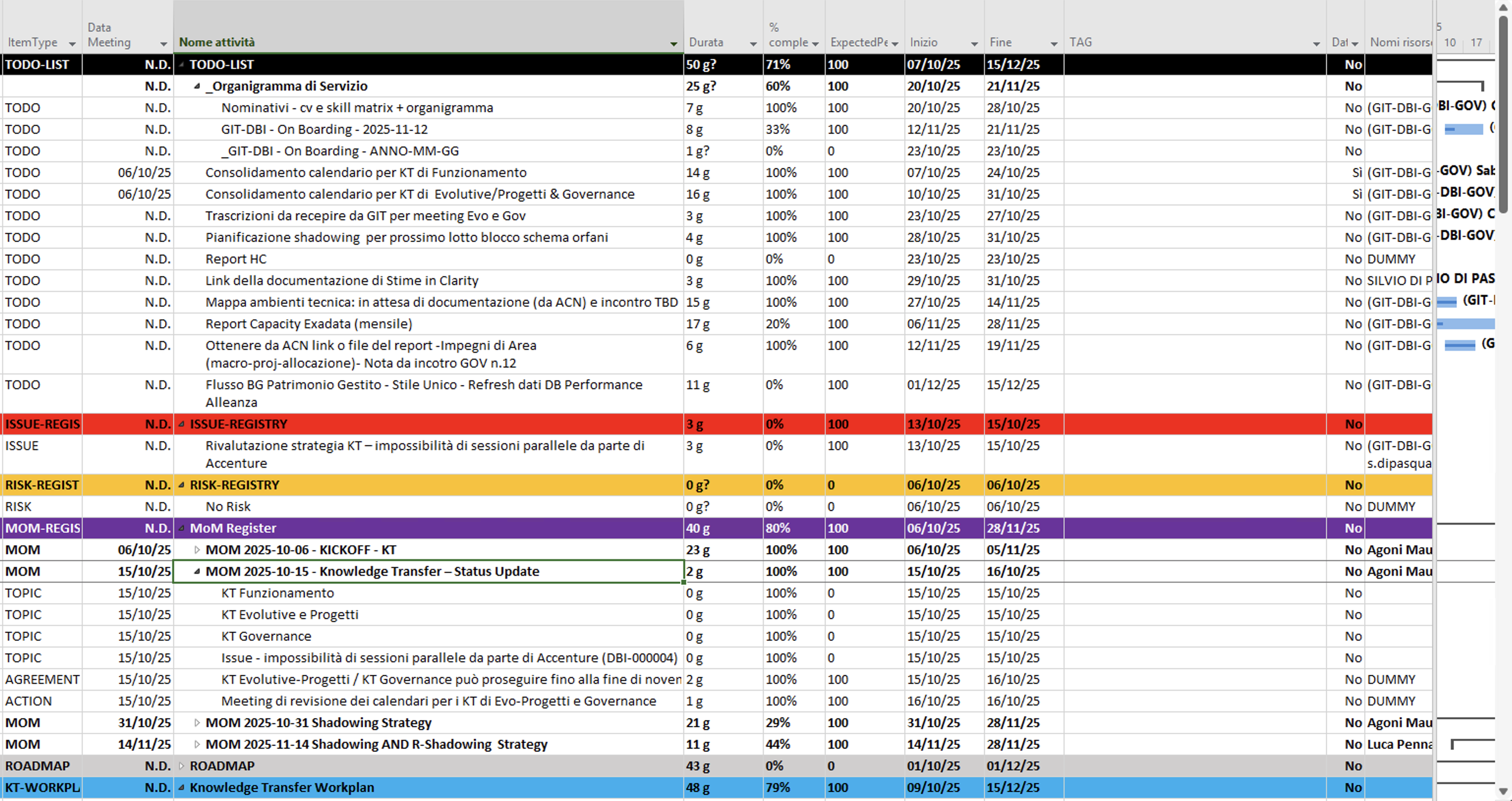
Steel extends MS-Project with a structured governance layer: tasks, deliverables, issues, risks, minutes of meeting and roadmap items all managed in one place — with timebox classification, expected progress tracking and lifecycle status.
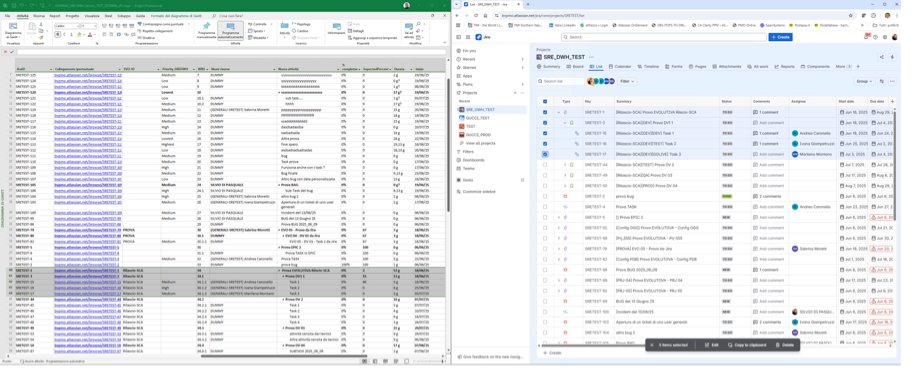
Tasks flow from MS-Project into Jira. Time logs, status updates and completion percentages recorded by assignees flow back automatically — enabling EVM calculation without manual data entry.
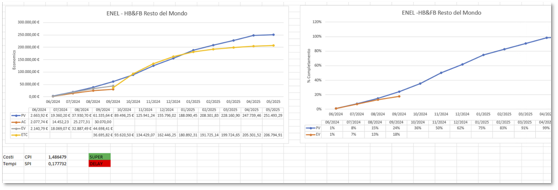
Generate cost control reports from customizable Excel templates. Earned Value curves, CPI, SPI and ETC are calculated automatically from actuals collected through Steel — no spreadsheet maintenance required.
Steel is designed for project managers who coordinate diverse teams, including distributed teams, use MS Project for planning, and need structured reporting—not just simple dashboards.
Plan in MS-Project, let your team work in Jira, and collect actuals automatically. No more chasing updates or reformatting reports.
Standardize governance across multiple projects. Steel brings consistent structure to deliverable tracking, timebox management and EVM reporting.
Teams continue working in the issue-tracking tools they already use. Steel handles synchronization: time logs and progress updates flow into MS Project without additional manual steps.
Download Steel Free, install the add-in and open the sample project. Steel will guide you through registration directly inside MS-Project — no web forms, no setup wizards. You will be running your first sync in under 5 minutes.

The core MS-Project add-in that powers Steel Free. SIE installs directly into Microsoft Project Desktop and appears as a dedicated ribbon tab — no changes to your existing project files or setup. All Steel features run through SIE.
Windows · MS-Project 2016, 2019, 2021An Excel file that drives Steel's operational settings: timebox parameters, deliverable categories, Jira field mapping and EVM calculation setup. Adapt it once to your project context and it runs silently in the background.
Excel · fully customizableA self-contained Excel reporting template, independent from the side-car. Pre-built pivot tables let you define which data domains to represent — progress, budget, EVM, risks — and generate structured status reports ready for stakeholder meetings.
Excel · pivot-based · fully autonomousA dedicated Jira instance, pre-configured and ready to synchronize with Steel. Supports up to 10 team members. No need to involve your company's existing Jira tenant — this is yours, separate and independent.
Up to 10 users · no expiryA ready-to-use .mpp file with tasks already classified by timebox, deliverable type and governance status. Open it, hit Sync — and see Steel working in under 5 minutes.
A personal Quick Start link arrives in your inbox as soon as you register — step by step, from install to first sync in under 5 minutes. The link is yours to keep and share.
Delivered after registration · yours to shareAlready using Jira in your organization? Choose your setup:
Use the personal Jira instance included in the package — pre-configured, isolated from your company systems, ready to sync with Steel out of the box.
Steel Free connects directly to your company Jira tenant from day one. No dedicated environment needed — just point Steel to your tenant URL and you are operational immediately.
Started on the dedicated environment and want to move later? You can migrate your project — including all tasks, configurations and history — to your company Jira tenant at any time, with no data loss.
One download. Install the add-in, open the sample project and register directly inside MS-Project. Your Jira environment and Quick Start Guide arrive by email automatically.
Steel Free is launching soon. Write to support@steelmpx.io to join the early access list.
Answers for project managers evaluating Steel Free.
Steel is an add-in for Microsoft Project Desktop that adds governance, integration with issue tracking and ITSM tools, and automated Excel reporting. It does not replace MS-Project or your execution tools — it connects and governs them.
Yes. Steel Free is a fully functional version, not a trial. Advanced multi-tool and enterprise features will be available in future paid editions, but the core governance and Jira integration will remain free.
Steel supports Jira Cloud and Jira Data Center. Server support is being evaluated based on demand. Both single-instance and multi-instance scenarios are planned.
Both. Steel uses the Jira REST API and connects via standard authentication methods (API token for Cloud, personal access token for Data Center).
Ceptah Bridge focuses on MS-Project ↔ Jira synchronization for single instances. Steel adds a governance layer above the sync: deliverable tracking, timebox management, EVM calculation, Excel reporting, and a roadmap toward multi-tool integration (ClickUp, Wrike, ServiceNow).
Steel runs on Windows with Microsoft Project Desktop (2016, 2019, 2021). It is an add-in that installs alongside your existing MS-Project setup.
For product information, early access or support requests, write to support@steelmpx.io. We respond within 1–2 business days.
Read our full Privacy Policy to understand how Steel handles your data. View Privacy Policy →
Read the Terms of Use that govern the use of Steel Free and the Steel platform. View Terms of Use →